
Limits
How many hubs, skills, clients, permissions, and daily uses your plan allows.
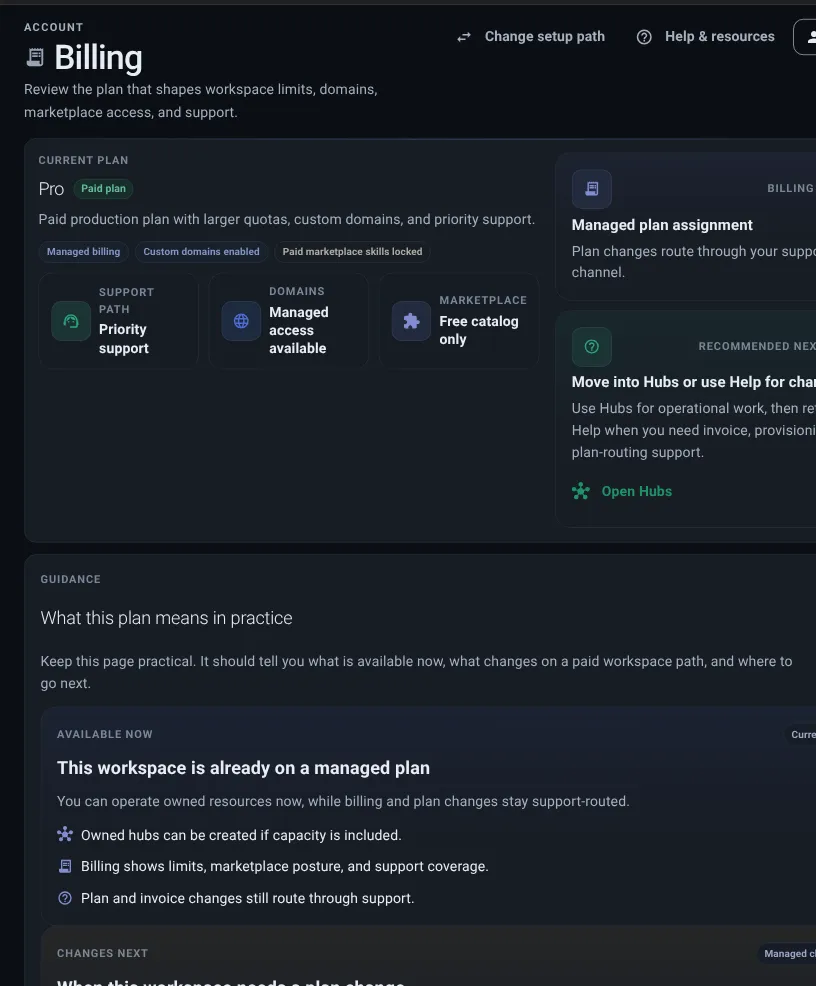
Billing shows what your plan allows right now.
Start here when a button is locked, disabled, or says upgrade required. Many blocked actions are plan or usage questions, not broken setup questions.
Billing is the source of truth for exact allowances: owned hubs, autoscaling hub slots and worker ceilings, private skill setups, runtime operations, hub release operations, client connections, hub addresses, paid Skill Store access, and help options.
Some readers call this a billing wall, can’t add problem, plan gate, or upgrade required state. Check Billing before changing setup.
If you are just starting, Free Tier explains the smallest path: public hubs, one connection, narrow permissions, and Billing when a button is locked.
Daily Desk follows the same plan ladder. The public Daily Desk demo is memoryless. A Private workspace is the first self-serve upgrade path for Daily Desk memory, analytics, clients, and private skills. Team is for shared operations. Paid vertical pilots are scoped separately with Thalovant when a real workflow needs hands-on packaging.
Limits
How many hubs, skills, clients, permissions, and daily uses your plan allows.
Runtime
Whether private skill setups, runtime config, skill updates, and runtime updates are available.
Hub updates
Whether owned hub capacity is available for hub creation and hub release operations.
Autoscaling hubs
How many hubs may scale automatically and the worker ceiling for each one.
Hub addresses
Whether custom hub addresses are available.
Skill Store
Whether paid Skill Store access is available for the workspace.
Help options
The help choices available for your plan.
Private skill setups means your plan includes space for your own skill groups and shared runtime settings. In plain language, it is what lets your workspace run hubs with their own skills instead of only using public hubs.
| Plan item | Why it matters |
|---|---|
| Owned hubs | Needed to create and run private workspace hubs. |
| Autoscaling hubs | Reserves hubs that may add complete workers automatically under load. |
| Runtime slots | Needed when private hubs need their own skills and runtime config. |
| Private skills | Needed when your own hubs need custom skill groups. |
| Client limit | Controls how many client connections can be created. |
| Policies | Controls how many access policies can govern clients and hubs. |
| Daily intents | Controls daily live hub intent previews and usage. |
| Hub addresses | Allows custom hub addresses for the workspace. |
| Public hub listing | Allows hubs to appear in discovery. |
| Paid Skill Store access | Shows whether the workspace can use paid entries if they are offered. |
| Live Map | May depend on owned hubs or private workspace features. |
| Path | Good for | Usually includes |
|---|---|---|
| Free path | Learning, trying public hubs, and creating a simple connection. | Public hub discovery and an included connection allowance. |
| Workspace path | Running owned hubs and private skill setups. | Owned hubs, private skill setups, runtime and hub update access, hub addresses, more connections, and help options. |
Use this map when a Daily Desk or showroom action sends you to Billing.
| Buyer step | Plan or offer | What it means |
|---|---|---|
| Try Daily Desk | Free | Public Daily Desk is available as a memoryless proof surface. |
| Create private workspace | Private | Private Daily Desk can use workspace memory, analytics, private skills, clients, and runtime capacity. |
| Share operations | Team | Several people, hubs, runtimes, and client groups can use the same workspace with priority support, including one autoscaling hub with up to eight workers. |
| Package a workflow | Paid pilot | Office, clinic, hospitality, developer, or private edge workflows are scoped with Thalovant outside self-serve checkout. |
If you land on Billing from a locked button or page, Billing explains why. For example:
When a page sends you to Billing, read the gate in this order:
This keeps plan questions separate from setup questions. If the plan allows the action but it still does not work, return to the page you came from and read the status message.
Use the locked button scenario when you need to decide whether a blocked action is a plan limit or a setup issue.
Use Free Tier when you want the no-surprises route before choosing a private workspace plan.
Billing is clear when you know: