
Workspace default
Best for most hubs. Hubs that use the default get the same basic abilities.
A skill set is the group of skills a hub can use. You manage skill sets from Skills.
If a hub is the place to connect and a client is what connects, skills are what make the hub useful.
Each skill set also has a runtime. Runtime is the working setup behind those skills: language, location, speech defaults, blocked skills, live skill status, and updates.
Use Manage Updates when you need to decide whether an update belongs to a skill package, runtime container target, hub container target, or Billing check.
| Question | Simple answer |
|---|---|
| What are skills? | Abilities a hub can use. |
| What is a skill set? | A group of skills assigned to one or more hubs. |
| What owns runtime config? | The skill set. |
| When should I use the default? | When most hubs should behave the same way. |
| When should I separate it? | When one hub needs different abilities, settings, or review. |
Workspace default
Best for most hubs. Hubs that use the default get the same basic abilities.
Separate skill set
Best when one hub needs different abilities or a slower update pace.
Runtime config
Best when the skill set needs different language, location, speech, or blocked-skill defaults.
Skill sets matter because permissions often refer to what a hub can do. When a skill is added, updated, removed, or changed, check whether permissions still make sense.
Use the workspace default when hubs should behave the same way. Create a separate skill set when one hub needs different abilities or a careful review before updates.
For a first setup, keep the workspace default unless you can clearly name what needs to be different.
| Term | Plain meaning | Example question |
|---|---|---|
| Skill set | The group of skills a hub can use. | Should this hub have the same abilities as other hubs? |
| Runtime | The working setup behind the skill set. | Should these skills use a different language, location, or speech setup? |
| Runtime config | The guided settings for runtime defaults. | Do I need to change language, location, speech, or blocked skills? |
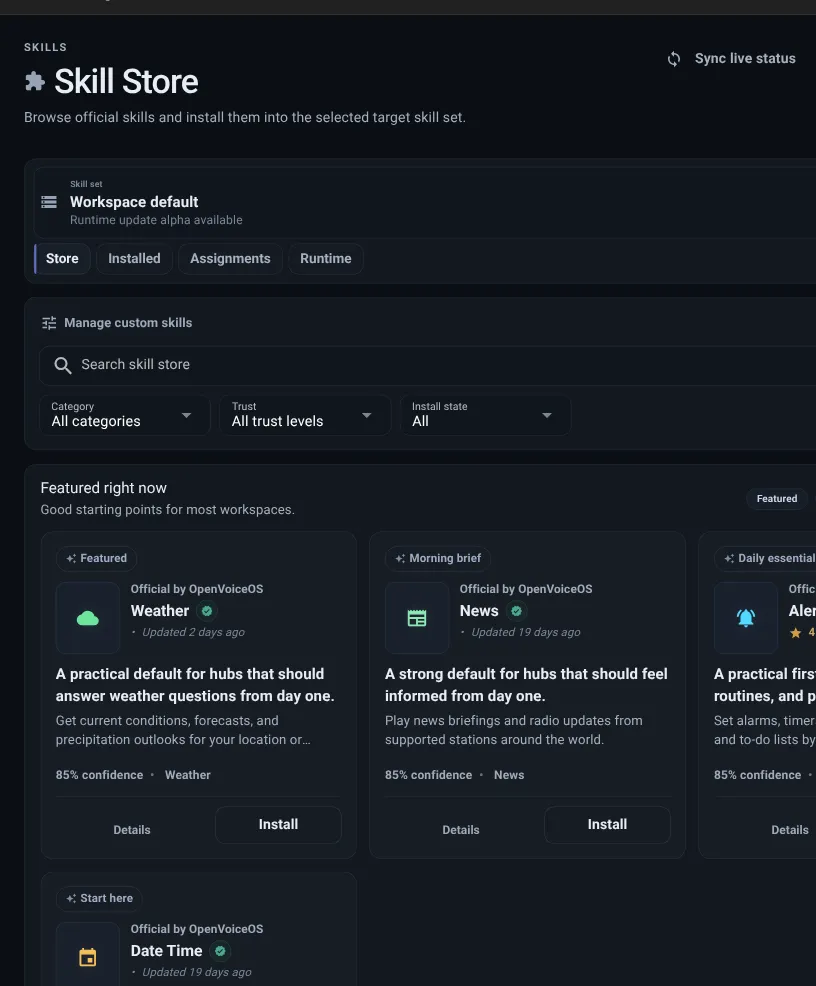
The Skill Store lets you browse and add skills.
Skill cards can show:
Want to run a skill you wrote yourself? Use Add custom skill in the store view — a Git repository URL or package name is enough, private repositories included. Add Your Own Skill walks through it.
Private memory is a Private or Team workspace skill path. Add thalovant-skill-memory only to the private skill set that should remember context, then store its scoped runtime token in the skill secret field. See Memory for the full setup and revoke test.
The Installed view shows the skills already added to the selected skill set. Use it to:
To see the intents an installed skill answers, with the sentences that reach them in each language, a connected client can ask the hub directly. See What Can My Hub Be Asked?.
Source Scout has no topic allowlist by default. Adult hubs can ask source-backed questions about any subject; the available sources determine whether a useful answer can be returned. It accepts the full OVOS locale tag from the runtime, including language, script, and region, rather than limiting requests to English or French.
Use Configure on the installed Source Scout skill only when the skill set serves children:
Protection checks both the question and the sourced answer. If the protection service cannot make a decision, Source Scout withholds the answer. Leaving the toggle off keeps knowledge unrestricted and does not run age classification.
The Runtime view helps you answer:
Runtime config is where you adjust shared defaults for the selected skill set.
Set primary language, secondary languages, location, speech-to-text, and text-to-speech.
Block skills that should not load for this skill set.
Review the generated summary before saving so you know what will change.
When a skill update is available:
Applying a skill update is one click per skill, or Update all for the whole skill set; the runtime installs the released version and reports back when it is live.
Skill updates change installed skill packages. Runtime updates change the core and messagebus images behind a runtime group. Hub updates change the listener and preview bridge images behind a hub. Use Manage Updates when Dashboard points to runtime or hub releases.
A skill set is ready when:
Read Runtime when you need the deeper model, or Configure Runtime when you are ready to change defaults.
Understand runtime
Configure runtime
Manage updates