
Voice client
Best for rooms, kiosks, and assistants that listen and speak with Thalovant Voice.
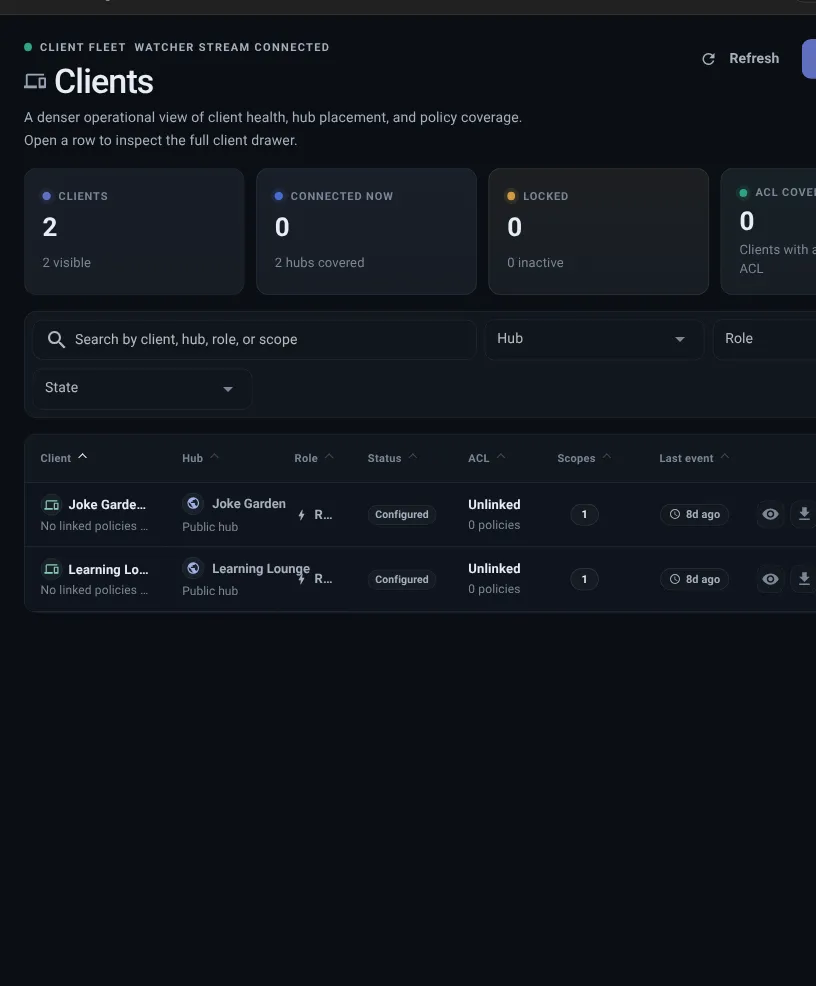
A client is the app, device, or experience that connects to a hub. In the product, you manage clients from Connections.
Clients are not just names in a list. A client is connected to one hub, has a setup path, and has permissions.
Give each connection a clear name so you can recognize it later in Dashboard, Permissions, and Live Map.
Before creating a connection, choose the hub it should use. After creation, review permissions and Live Map so the setup is easy to verify.
| Question | Simple answer |
|---|---|
| What is a client? | The app, device, browser flow, or experience that connects. |
| Where do I manage it? | Connections. |
| What does it connect to? | One hub. |
| What does first setup use? | A secure one-time setup link. |
| What file can still matter? | A private connection file for advanced or recovery paths. |
| What limits it? | Permissions. |
| Where do I check it? | Clients first, then Dashboard and Live Map. |
Voice client
Best for rooms, kiosks, and assistants that listen and speak with Thalovant Voice.
Web chat
Best for browser conversations without installing a desktop app.
Developer client
Best for CLI, API, diagnostics, automation, or local testing.
Embedded client
Best for hardware, firmware, and small-device provisioning.
Before creating a connection, choose the hub it should use and decide what the client is for.
Do not create several clients just to test names. Create one connection, pair it, give it narrow permissions, and confirm it appears where expected.
For a guided task flow, use Connect a Client.
| Type | Best for | Permission style |
|---|---|---|
| Observer | Clients that only need to check status. | Read-only access. |
| Question client | User-facing experiences that ask normal questions. | Questions allowed, wider control blocked. |
| Skill helper | Clients that help Thalovant see available skills. | Skill sharing plus only the small reads it needs. |
After creating a connection, Thalovant prepares a setup link. That link can be used once and expires.
For Thalovant Voice, the setup page can download the app, open it, and wait for the first heartbeat. On Linux, it can copy a single command that installs, pairs, and starts the voice runtime.
For Web chat, Developer, and Embedded connections, open or copy the setup link into the target client or provisioning tool.
If a setup link expires, is shared, or was already used, create a new setup link from the connection actions.
Most first setups should use the setup link. Some developer, embedded, or recovery paths may still need a private connection file.
If you are asking “where is my config file?”, start with the client record. Some teams say config file when they mean the private connection file.
For security, Thalovant may ask for two-step sign-in or a recovery code before showing the file. First-time setup may offer the file right away so you can finish connecting the client.
The client is what you manage in Thalovant. The setup link or connection file is what the app, device, or tool uses to pair.
If setup material is lost or exposed, do not just rename the client. Create a new setup link, pause access, quarantine the identity when review is recommended, lock it when permitted, or recreate the client when a private file may have been exposed.
Client settings can allow broader actions:
Most clients should start simple. Add only the extra powers the client truly needs.
Good client names describe purpose or location, not just a person. Names like frontdesk-client, skill-sync, or kiosk-reader are easier to recognize than test-1 or main.
When a client shows stale or warning state later, a clear name helps you know which app, device, or service needs attention.
The Connections page shows status, type, permissions, identity security, and last activity. A live dot means the client is connected now. Stale or missing means Thalovant has not received a fresh update for that client.
Review identity means the client identity has not reported presence for the review window. Confirm the app, device, or service is still expected. If the dashboard recommends quarantine, use Quarantine identity, then rotate or recreate the identity before restoring access.
Useful actions include:
Some teams describe this as client offline, client not connected, can’t connect, setup link expired, client missing, client disappeared, config file missing, or connection file missing. Start with the client record before changing the hub.
If the person says the device is gone or device gone, still start here. A device usually maps back to a client record, setup link or connection file, and live state.
Check these in order:
A client is ready when: